← Platform
Video Collection & Analysis

Every video response. Fully analysed.

Qualzy's video pipeline turns hours of footage into structured, searchable insight - automatically. Transcription, translation, key points, clips, and a full reel editor. No external tools needed.

How It Works

One video in. Complete insight out.

Every participant video follows the same pipeline - automatically, from the moment it arrives, with no action required from the researcher.

01
Upload

Participant uploads a video response via any browser on any device. No app to install. The moment they submit, Qualzy receives the file and the pipeline begins.

02
Auto-Transcription

The moment the video arrives, Qualzy automatically generates a full transcript. For multilingual projects, a translated version is created simultaneously. Both are preserved alongside the original video.

03
AI Key Points Extracted

AI analyses the transcript and extracts key points - each one a distinct thought, with supporting verbatims (direct quotes with timestamps). A 20-minute video becomes 6–10 focused key points in minutes.

04
Verbatims Become Clips

Every verbatim can be turned into a video clip with one action. Clips are ready to use immediately - in theme analysis or the Clip Reel Creator. No manual scrubbing required.

05
Build Your Reel

Compile the most powerful clips from across all participants into a Clip Reel. Add section titles, transitions, and a brand title card - then export a stakeholder-ready MP4. All inside Qualzy, with no external editor needed.

Transcription & Translation

Watch less. Understand more.

Every video and audio response is transcribed and translated automatically - before you even open the project. You arrive to structured text, not raw footage.

Instant Transcription

Every video and audio upload is automatically transcribed the moment it arrives. Researchers see the full transcript alongside the video - timestamped throughout. Mark start and end points directly from the transcript, or scrub through the video. Either way, you're navigating by words, not time codes.

Timestamped throughout Scrub via transcript All audio types

Automatic Translation

For multilingual projects, a translated version is created alongside the original. Researchers can moderate and analyse in English while participants respond in their own language. Both versions are preserved - the original for accuracy, the translation for speed. Subtitles are generated automatically and shown during video playback.

30+ languages Auto-subtitles Original preserved
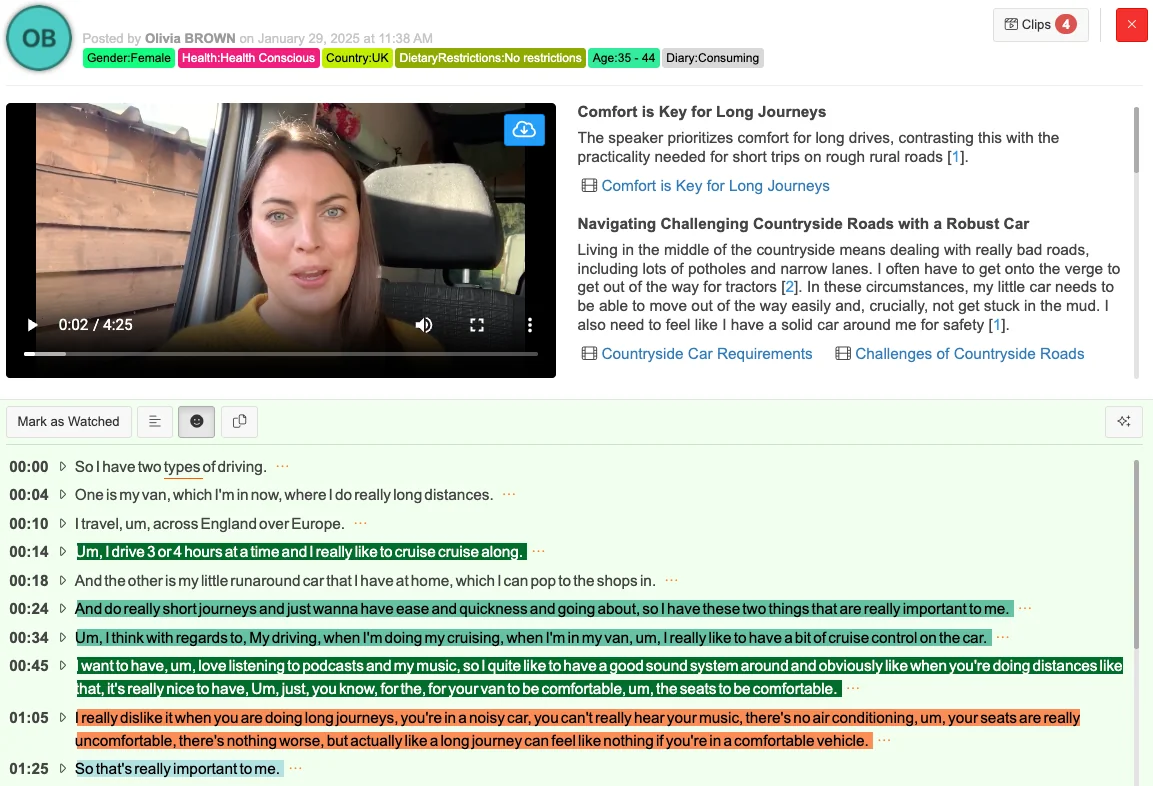
Qualzy video response view showing a participant video with AI-generated summary, key points, and verbatims alongside
Key Points & Clip Discovery

The signal, without the noise.

AI extracts key points from every video transcript - structured, navigable, and ready to act on. A 20-minute video never needs to be watched in full.

How key points work

Distinct thoughts, extracted automatically

AI reads the transcript and identifies each distinct thought or theme in that participant's submission - turning a 20-minute monologue into 6–10 structured key points.

Each key point has verbatims

Supporting each key point: the exact quotes from the transcript that led AI to that conclusion - timestamped, so clicking a verbatim jumps straight to that moment in the video.

Verbatims become clips instantly

Every verbatim can be turned into a video clip with one action. No scrubbing, no time codes to note down. The clip is immediately available across the whole project.

Query with Maizy Chat - any time

Maizy Chat can query across all key points from all video responses at any point - during or after fieldwork. Ask "What did participants say about price?" and get an answer drawn from every submission in the project.

Raw transcript 549 words
So I have two types of driving. One is my van, which I'm in now, where I do really long distances. I travel, um, across England over Europe. I drive 3 or 4 hours at a time and I really like to cruise along. And the other is my little runaround car that I have at home, which I can pop to the shops in. And do really short journeys and just wanna have ease and quickness going about, so I have these two things that are really important to me. My driving, when I'm doing my cruising, when I'm in my van, I really like to have a bit of cruise control on the car. I want to have, um, love listening to podcasts and my music, so I quite like to have a good sound system around and obviously like when you're doing distances like that, it's really nice to have - just, you know, for your van to be comfortable, the seats to be comfortable. I really dislike it when you are doing long journeys, you're in a noisy car, you can't really hear your music, there's no air conditioning, your seats are really uncomfortable, there's nothing worse, but actually like a long journey can feel like nothing if you're in a comfortable vehicle. So that's really important to me. It's less important in my little runaround, but I live in the middle of the countryside, we have really bad roads, lots of potholes, narrow roads, you're often having to get up onto the verge to get out of the way or to allow a tractor to come through. And in that circumstance, I need to have a little car that I know can move out of the way but also isn't gonna get stuck in the mud, and I need to feel like I have a solid car around me. So I love brands - for my van, I love brands such as Mercedes, nice comfy cars with good reliable engines, but for being in the countryside I tend to go for older models because they just feel a bit chunky around me and I like to feel like I'm not going to be in a little bit of tin that's gonna get squashed by a tractor. I would never drive brands like a smart car. I really dislike them. They're fantastic for if you're in town, but in the countryside they just get stuck in mud. It's actually quite scary having a massive tractor go past you when you're in such a tiny little flimsy car. So I like to feel like I have something solid. Maybe a Land Rover. I haven't really gone as big as a Land Rover, but in the countryside I'd rather have something reliable and safe on the country roads. So yeah, brands like Land Rover - definitely not Fiats or smart cars. I feel like yes, it's more important to me to get a good mix. As I said, the roads are really bad. The traffic's not too bad - lots of tractors, farm animals, people on bikes, country walkers. So yes, I guess it's also important to me that once I hit a big road I can kind of push on and keep up with the traffic.
AI extracting key points…
4 key points extracted from 549-word transcript
1
Navigating Challenging Countryside Roads with a Robust Car
Living in the middle of the countryside means dealing with really bad roads, potholes, and narrow lanes. My car needs to move out of the way easily and not get stuck in the mud - and I need to feel like I have a solid car around me for safety.
2
Comfort and Entertainment for Long-Distance Van Journeys
When driving my van for long distances, comfort and entertainment are paramount - cruise control, a good sound system for podcasts and music, comfortable seats. A comfortable vehicle can make a long journey feel like nothing.
Van Comfort and Entertainment 00:42 – 01:05
"I really like to have a bit of cruise control on the car… I quite like to have a good sound system around and like when you're doing distances like that, it's really nice to have your van to be comfortable, the seats to be comfortable."
Dislikes for Long Journeys 01:05 – 01:25
"I really dislike it when you are doing long journeys, you're in a noisy car, you can't hear your music, there's no air conditioning - but actually a long journey can feel like nothing if you're in a comfortable vehicle."
3
Versatility: Handling Country Roads and Motorways
Beyond bad country roads, it's important that once I hit a bigger road like a motorway my car can push on and keep up with traffic. That versatility across both environments is key.
4
My Two Distinct Driving Experiences and Priorities
I have two very different types of driving - long-distance travel in my van across England and Europe, and short quick journeys in my small runaround car at home. Each has completely different requirements.
A 4.5-min video still generates 549 words to read. A 60-min IDI? Over 7,000.
Clip Reel Creator

From raw footage to stakeholder showreel. In one tool.

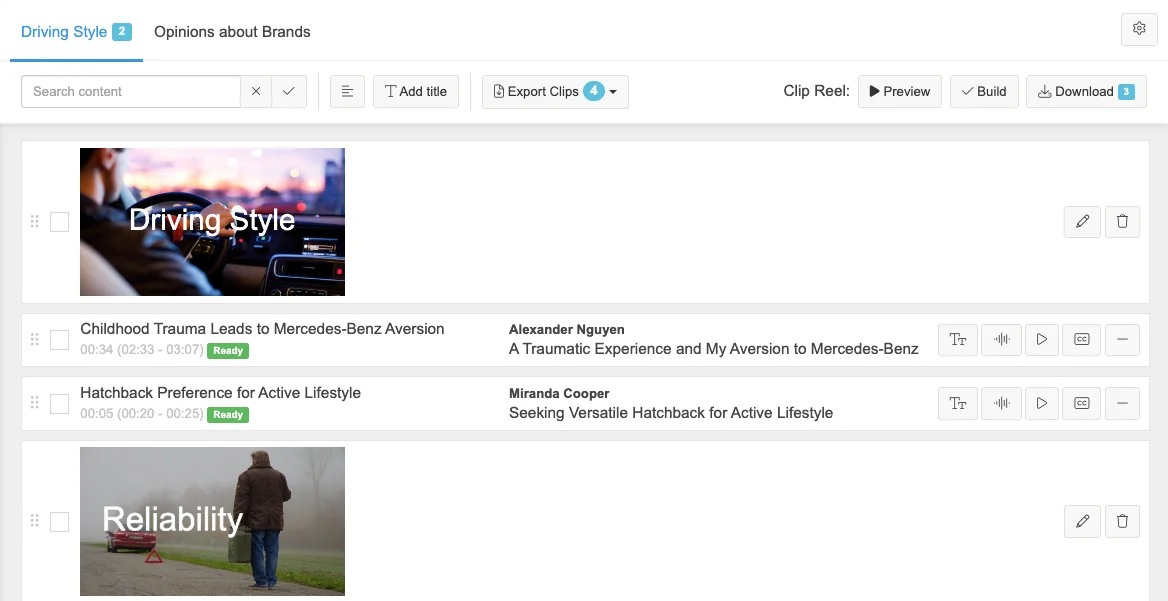
Instead of a 40-page report, send a 4-minute reel of 12 participants articulating the same insight in their own words. That's the debrief that gets remembered. And you can build it entirely inside Qualzy.

Qualzy Clip Reel Creator showing a video timeline with participant clips arranged into sections, ready for export
Select clips from across the dataset

Pull clips from any participant's video - across the entire project. Find them by key point or by theme.

Drag to arrange in any order

Reorder clips freely. Tell the story in the sequence that makes the most sense for your audience, not the order in which fieldwork ran.

Add section title slides

Introduce themes or groupings between clips with branded title cards. Give stakeholders clear signposts through the reel.

Add transitions & brand title card

Smooth transitions between clips and a branded opening card. The finished reel feels produced - because it is.

Export as MP4 - no external tools

Export a stakeholder-ready 1080p MP4 directly from Qualzy. No Premiere. No After Effects. No waiting for a video editor to have time.

Subtitles included automatically

Every clip comes from a transcribed verbatim, so subtitles are generated automatically and shown on playback. No captioning tool needed — and no silent clips for viewers watching without sound.

Part of Your Research, Not Separate From It

Video data that works alongside everything else

Video clips and key points are full project data - not isolated files sitting apart from the rest of your analysis. Every clip, every verbatim, every key point feeds into the same unified project layer as your text and form responses.

Maizy Chat queries across video key points

Ask "What did participants say about price?" and Maizy Chat draws on key points from every video response in the project - at any point during or after fieldwork.

Theme Analysis includes video key points

When you generate themes after fieldwork closes, key points from video responses sit alongside text responses. A mixed-methods project gives you a genuinely mixed-methods analysis.

Clips available from any analysis view

Reference clips from themes and key point panels. Video evidence is always one click away - wherever you're working in the project.

Query across video, text & forms together

Running a mixed-methods project - video uploads, text responses, form questions all in one study? Maizy Chat queries across all of it. One dataset, one conversation.

Running interviews on Zoom or Teams?

You can import those recordings too. Every imported IDI or group discussion gets the same full pipeline - auto-transcription, key points, clips, everything. A low per-minute import fee applies at upload; all analysis is included from there.

See IDIs & Groups →
The Difference It Makes

Video analysis that used to take days. Now takes minutes.

1 hr

A 1-hour interview generates a full transcript, 8–15 key points, and 20+ ready-to-clip verbatims - automatically, before you've opened the response.

30 min

Clip reels built in Qualzy take 30 minutes. The same reel built in Premiere takes a day - and requires someone who knows how to use it.

Any n

Every video response is analysed with the same depth, regardless of sample size. 10 participants or 500 - the pipeline runs the same way for all of them.

"Platform enables capture of mobile videos, photo diaries and lived experience narratives."

See It In Action

See the video pipeline in action

We'll show you a real project - transcription, key points, clip marking, and a finished reel - in a 15-minute discovery call.