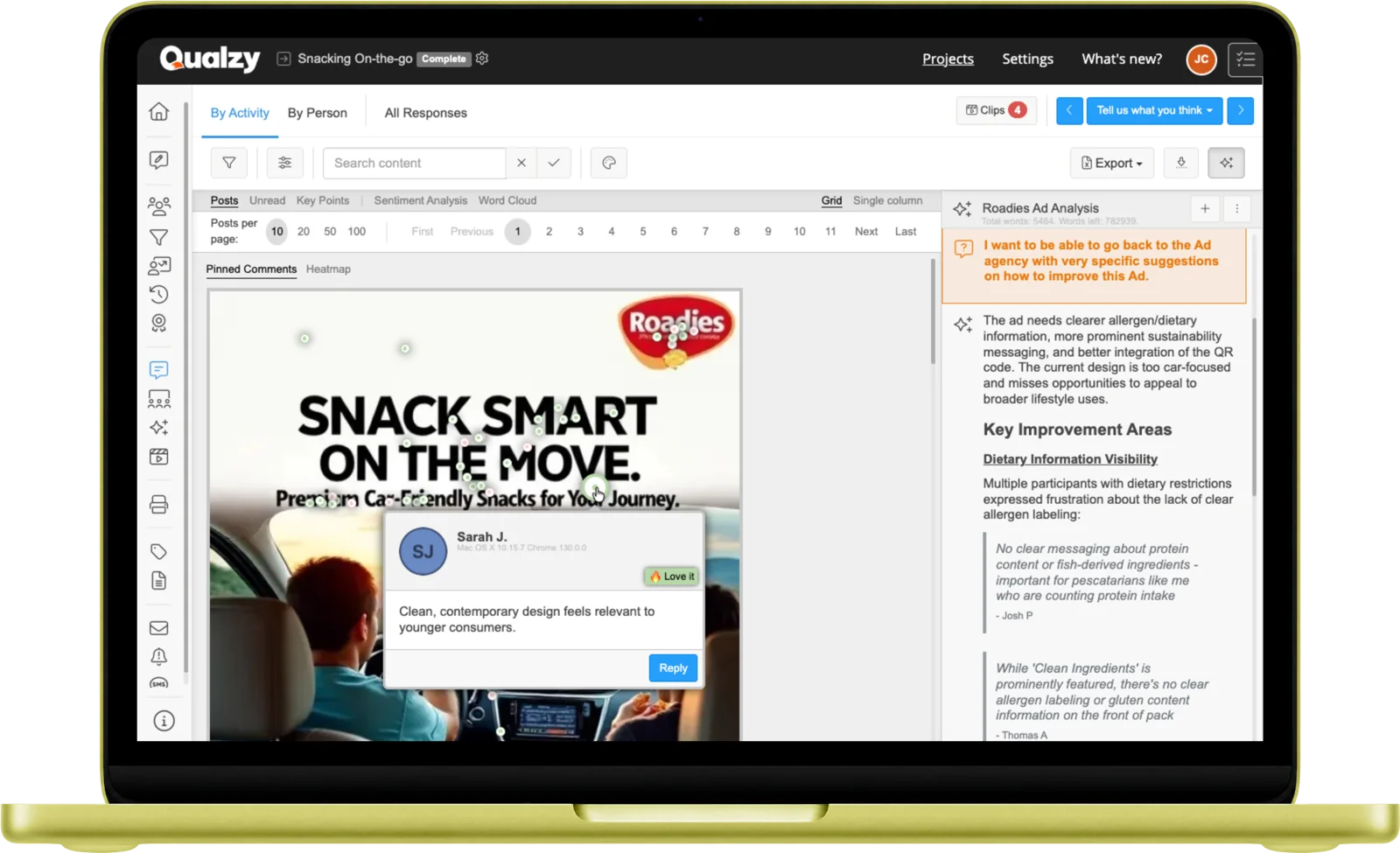
See exactly where attention goes. Participants pin and annotate the moments that matter, creating a heat map of attention combined with the qualitative reasoning behind it.
How it works
Researchers upload the image to be evaluated: a packaging design, a webpage, a print advertisement, a shelf layout, a concept board. Multiple images can be presented in sequence.
Participants tap or click on the areas that attract them, concern them, confuse them, or delight them. Each pin placement is captured with its exact coordinates on the image. Researchers can set a maximum number of pins to keep responses focused and considered rather than exhaustive.
Each pin can require a comment, participants explain why they placed the pin there. Researchers can also configure customisable pin tags (such as Like, Dislike, or Confusing) so participants categorise their reaction before adding their explanation. The heat map shows the where; the tag and annotation show the why.
Participant experience
Participants see the image and tap to place their pins. On mobile, it works with a finger tap, no precision required. The experience is closer to marking a photo than completing a survey.
It works on any device through their browser: mobile, tablet, or desktop, with no app to install.
Participant opens the Pin Task in their browser on any device, via a link. No app required.
The image is displayed clearly, full-width on desktop, scrollable on mobile. Participants can zoom in to examine details before placing pins.
Taps or clicks anywhere on the image to drop a pin. The coordinate is captured precisely and automatically.
Explains why they placed the pin there: what caught their eye, what concerned them, or what they reacted to.
All pin coordinates and comments are captured instantly, ready for AI processing the moment the response arrives.
AI analysis
Every annotation is AI-processed the moment it's submitted, turning a heat map into structured qualitative insight.
Annotation Summaries
AI summarises the comments attached to each pin, giving a quick read of why participants focused on each area of the image, without needing to read every individual annotation.
Key Points
Key points are extracted from pin annotations across all participants, identifying the themes, concerns, and reactions that cluster around specific image areas. Each key point includes supporting verbatim quotes.
Maizy Chat
Use Maizy Chat to query across all pin annotations at any point during or after fieldwork: "What do participants say about the logo area?" or "Which elements attract the most concern?" Ask anything, in plain language.
Use cases
Identify which elements of a pack design attract attention (and which don't) alongside the qualitative reasoning for each placement. See what draws the eye before a pack ever reaches shelf.
Understand where attention goes in a print or digital ad, and whether the key message area is being noticed or overlooked. Combine heat map data with annotation to understand what's landing and what isn't.
Upload a webpage or app screenshot and map where participants focus, struggle, or find value, paired with verbal annotation that explains what they're experiencing and why.
Upload a planogram or shelf image and ask participants to pin the products they'd reach for first, with reasoning for their choices. Understand how category navigation actually works in practice.
15-Minute Discovery Call
Tell us about your research. You'll have a clear picture about how Qualzy could work for you by the end of the call.
Combine Pin Task with these to build richer, more layered study designs
Activity Type
Personal Canvas
Visual mood boards, collages, and matrix placement activities for associative and projective research.
Activity Type
Card Sort
Organise items into categories or rank by preference, revealing natural mental models and grouping logic.
Activity Type
Media Review
Capture immediate reactions to video stimulus with timestamped annotations and AI-processed responses.