
The research assistant you always wanted
AI that gives you
research superpowers
Qualzy's AI reads every response as it arrives: it translates, summarises and pulls out key points, each linked to the participant's own words. It helps you moderate in any language, you can ask questions of your data, and themes are built once fieldwork closes. It's included for every client, and nothing participants say is used to train AI.
AI at each stage of a project
From the first response to the debrief, there's AI help at each step, and you decide how much of it to use on each project.
-
As each response arrives
A translation, a summary and key points with verbatims, for posts, form answers, video and audio.
What the AI produces -
While you moderate
Suggested replies and follow-up questions, and replies in the participant's language.
Help with moderating -
Whenever you have a question
Maizy Chat answers from the data collected so far, during fieldwork or after it.
Maizy Chat -
Once fieldwork closes
Themes built from every key point, with the quotes and clips behind each one.
Theme analysis -
When you report
Clips cut from timestamped verbatims, gathered into a clip reel for the debrief.
Clips and reels
Every response is read the moment it comes in
Each post, form answer, video and audio response is processed as soon as it's submitted. Video and audio are transcribed first. Then the AI produces three things for that one response.
- Translation
- If the response isn't in the project's language, a translation sits beside the original.
- Summary
- A short, plain summary of what the participant said, so you know what a long post or video covers before you open it.
- Key points
- The distinct things the participant said, each written as one thought with the verbatim quotes behind it. In video and audio, every verbatim carries its timestamp, so it can become a clip.
A 20-minute video becomes a short set of key points. You can still watch all of it, but you'll know what's in it first. Recordings from Qualzy Live sessions, and interviews you import from Zoom or Teams, are handled the same way.
More on video analysisModerate in your own language
Your participants answer in their language, and you read and reply in yours. Qualzy translates in both directions as you go, so a Spanish or Japanese study doesn't need a moderator who speaks Spanish or Japanese.
Every post arrives with an English translation beneath it. You reply in English, it's translated as you post, and the participant reads it in their language. When they answer, that comes back to you in English too.
One project can hold participants writing in several languages, and you moderate all of them in yours. It works in a discussion and in a community, across 30+ languages.
More on research across marketsWant a starting point for your reply, even when the project is in your language? The AI can draft a thank-you or a follow-up question for any post, picking up what the participant actually wrote. If they write in another language, it comes in theirs with English beneath. You choose per project whether to use it, and nothing reaches a participant until you post it yourself.
Let an AI moderator follow up for you
Participants can take a Qualzy Discussion as a chat. An AI moderator follows up on each answer against the goals you set for every question, so "a fair bit" becomes "three to four cups a day" while the participant is still in the conversation.
- Follow-ups work to the goal you set for each question
- Photos, video, pin tasks, card sorts, card scores and diaries all work inside the chat
- Step in and moderate yourself at any time, or run the chat with no AI at all
- No extra cost, and nothing participants say is used to train AI models

Maizy beside you in a live session
In a Qualzy Live interview or focus group, Maizy works alongside you. Ask it what's happened so far, what's still to cover from your guide, or what needs following up.
- Follow-up questions suggested from what was just said, and who has gone quiet, at a glance
- Observers in the backroom can ask Maizy about the session too
- Live captions in each moderator's and observer's own language
- Afterwards, key points and suggested clips from everything tracked in the session
Ask your data a question, at any point
Maizy Chat lets you ask questions of the whole dataset in plain English, during fieldwork or after it. There's no waiting for the project to close.
It works from the key points already drawn out of every response, and its answers quote the participants they're based on, by name, so you can go straight to the source. Use it to test a hunch on day two, to compare one age group with another, or to pull together what people said about a concept before a client call.
Live sessions, imported recordings and online activities can sit in the same project, so Maizy Chat covers all of it, and so do themes once fieldwork closes.
Themes once fieldwork closes
Themes are the one part of the AI that waits. Patterns drawn from half the responses can point the wrong way, so you build themes when the data is complete: at the end of a discussion, after a Live project's sessions, or in a community, on each activity or wave once it has closed.
- Set the area you're interested in
- A broad "umbrella", such as reactions to a new pack or attitudes to price and value. It keeps the analysis on your research questions instead of summarising everything at once.
- Qualzy finds the themes
- It works through every key point that falls under the umbrella, with nothing sampled or skipped, and the themes come from the data rather than a list you start with.
- Insights, with the evidence attached
- Each theme breaks down into insights, and each insight links to the key points, verbatims and clips behind it, so you can check any finding against what people actually said.
- Straight into the report
- Compile the strongest clips from a theme into a clip reel, and move the themes and quotes into your report without days of manual coding first.
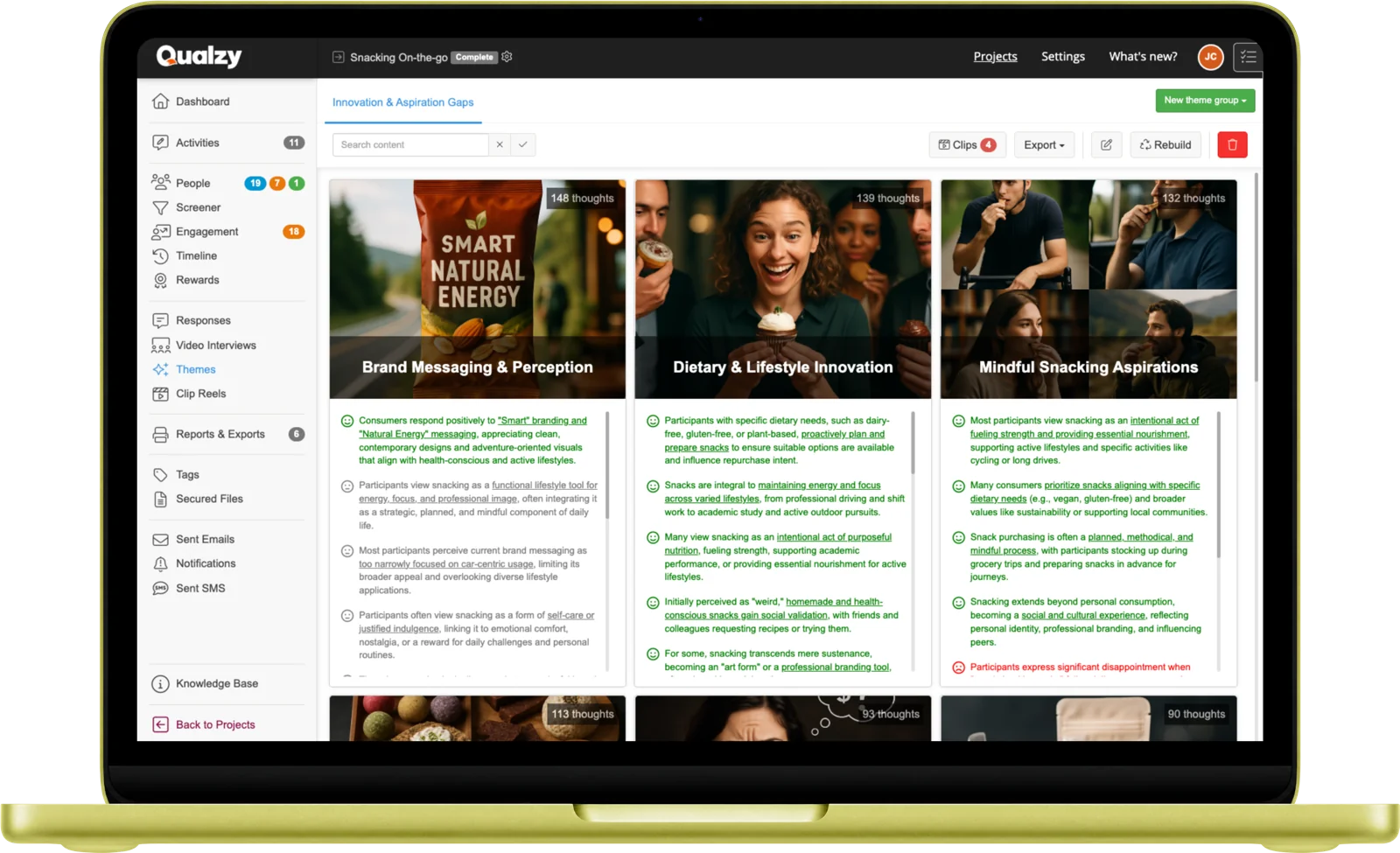
Maizy Chat for quick answers, themes for the full picture
They do different jobs, and most projects use both. Maizy Chat is for quick, targeted questions at any point, during fieldwork or after it. Themes are the thorough pass across everything once the data is in, with each finding backed by the quotes and clips behind it. Use Maizy Chat while fieldwork runs, and themes when you're writing the report.
Every AI feature in Qualzy
What each one does, and when it does it.
| Feature | What it does | When |
|---|---|---|
| Translation | Translates any response that isn't in the project's language and keeps the original beside it. | As each response arrives |
| Summaries | A short summary of each post, form answer, video or audio response. | As each response arrives |
| Key points | The distinct points a participant made, each with the verbatim quotes behind it. | As each response arrives |
| Clips | Timestamped verbatims from video and audio, ready to save as clips. | As each response arrives |
| Suggested replies | Thank-yous, follow-up questions and replies to your own instruction, for you to edit and post. | While you moderate |
| Language help | Suggestions written in the participant's language, with an English version beside them. | While you moderate |
| Maizy Chat | Answers questions about the dataset, quoting the participants behind each answer. | Any time, during or after fieldwork |
| AI-moderated chat | An AI moderator follows up with participants in a chat, working to the goals you set. | During fieldwork, if you choose it |
| Theme analysis | Themes, insights, verbatims and clips from every key point in the area you choose. | Once fieldwork closes (per activity or wave in a community) |
| Clip reels | Clips from across the project gathered into one reel for the debrief. | When you report |
| Qualzy Live sessions | Transcripts in 30+ languages, live captions, Maizy as a coach, then key points and suggested clips. | During and after each session |
| Qualzy Protect | A basic check on pasted text: simple rules, such as how quickly it was pasted, tag responses that may be AI-generated. | Throughout fieldwork |
What researchers say about the AI
Discovery Research, a full-service UK agency, runs short projects in Qualzy, often as pre-tasks before focus groups and IDIs.
"If you have 50 people and you have seven tasks for each, it's incredibly hard to analyse all that manually, but we can now."
Hamish Kynoch, Head of Qualitative Research, Discovery Research
"The other really important element in Qualzy is the AI analysis. I think that is basically transformative for these sorts of platforms."
Hamish Kynoch, Head of Qualitative Research, Discovery Research
"The AI video summaries are a game-changer! We used to have to sit and watch every video, take notes and figure out where to cut to create a reel."
Anthony Shephard-Williams, Director, Mustard Research
How the AI handles your data
- It can run in the project's home region. Run through Amazon Bedrock, whether your project is in Australia, Europe or the United States, the AI runs there too.
- It isn't trained on your research. Nothing participants say is used to train any AI model.
- You choose, project by project. The AI is switched on or off for each project, and suggested replies can be automatic, on request or off.
- It's included. AI features come with every plan, for every client, across all three products.
Questions about the AI
Is the AI included in the price?
Yes. AI features are included on every plan, for every client, in Qualzy Discussions, Qualzy Live and Qualzy Community. The AI-moderated chat costs nothing extra either. Find out more about pricing.
Is participant data used to train AI models?
No. Nothing participants say is used to train any AI model.
Where does the AI run?
It can run in the project's home region. Run through Amazon Bedrock, whether your project is in Australia, Europe or the United States, the AI runs there too. More on security and data protection.
Does the AI ever post to participants without me?
In a forum discussion or a community, no. Suggested replies are drafts, and you choose what to post. In the AI-moderated chat, the AI moderator does follow up with participants directly, working to the goals you set, and you can step in at any time or run the chat with no AI.
When can I use Maizy Chat?
At any point, during or after fieldwork. It works from the key points of every response collected so far.
Why does theme analysis wait until fieldwork closes?
Themes built from part of the data can point the wrong way, so they're built once everything is in. In a community, they run on each activity or wave once it has closed. Until then, the key points on every response are there for you. More on themes.
How do I check what the AI tells me?
Every key point carries the verbatim quotes it came from, and for video and audio, the timestamped moment. Maizy Chat quotes the participants behind its answers, and each theme shows the evidence that supports it. You can always go back to what was said.