
Everything you need for real research, from booking to the debrief.
Qualzy Live is Qualzy's own system for online focus groups and video interviews, and for interviews in a room recorded on your phone or iPad. The guide runs the session, your clients watch from a backroom, and the transcript, clips and findings are waiting when you finish. It's part of the Qualzy qualitative research platform, alongside Qualzy Discussions and Qualzy Community.
Your participants, ready and waiting.
Getting the right people into the room, on time and able to join, is half the battle. Qualzy Live does the running around for you.
- Book them your way. Participants pick their own times, a recruiter books them in, or you seat them yourself.
- A tech check days before. Camera, microphone and connection tested ahead of time, so problems are fixed before the day, not during it.
- Reminders that go out on their own. Participants confirm in one click, and you can chase anyone who has gone quiet.
- Overflow and no-shows, handled. Reserves for groups, waiting lists when they fill, and no-shows rebooked in one click.
- Never double-booked. Your free time is shared across every project.
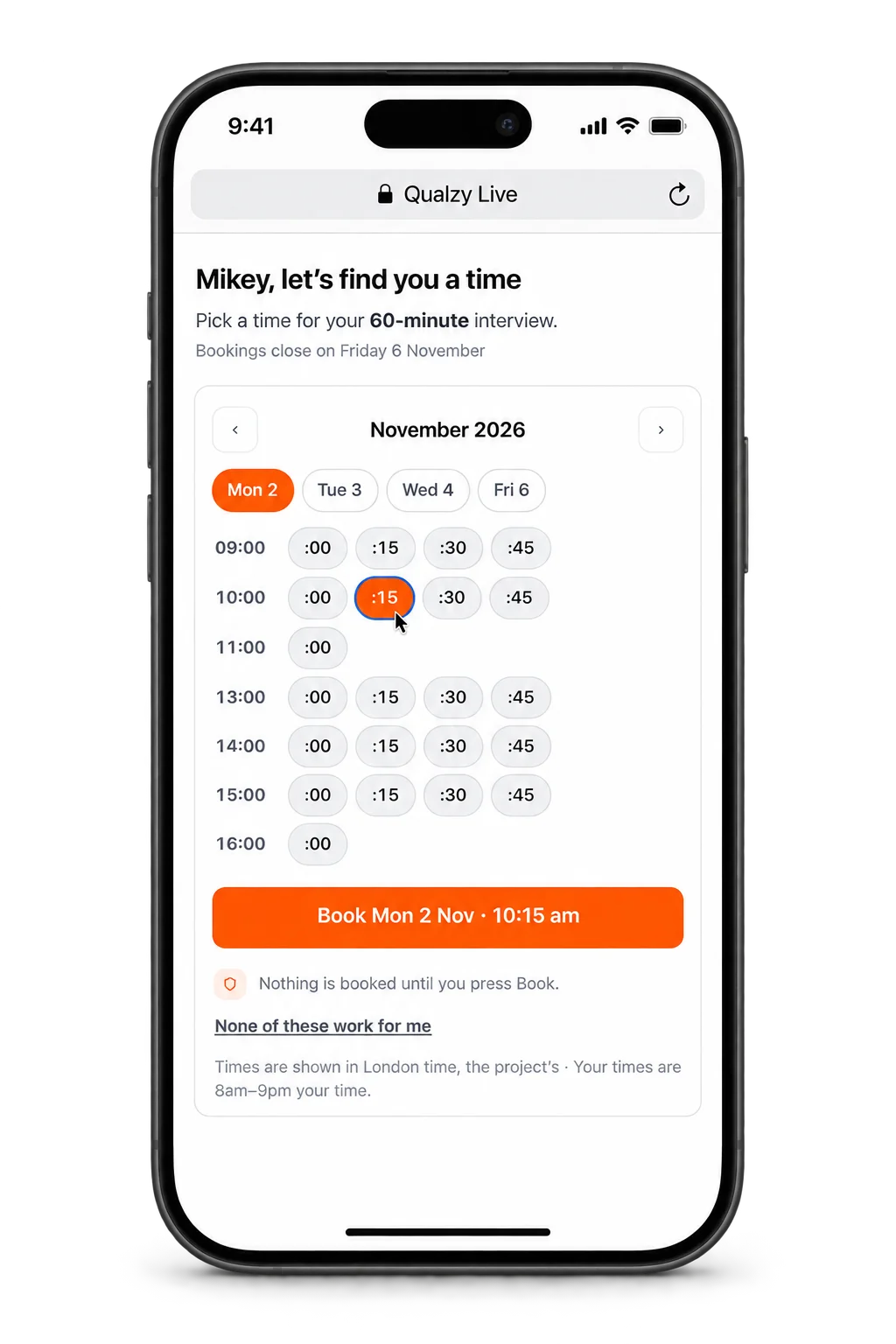
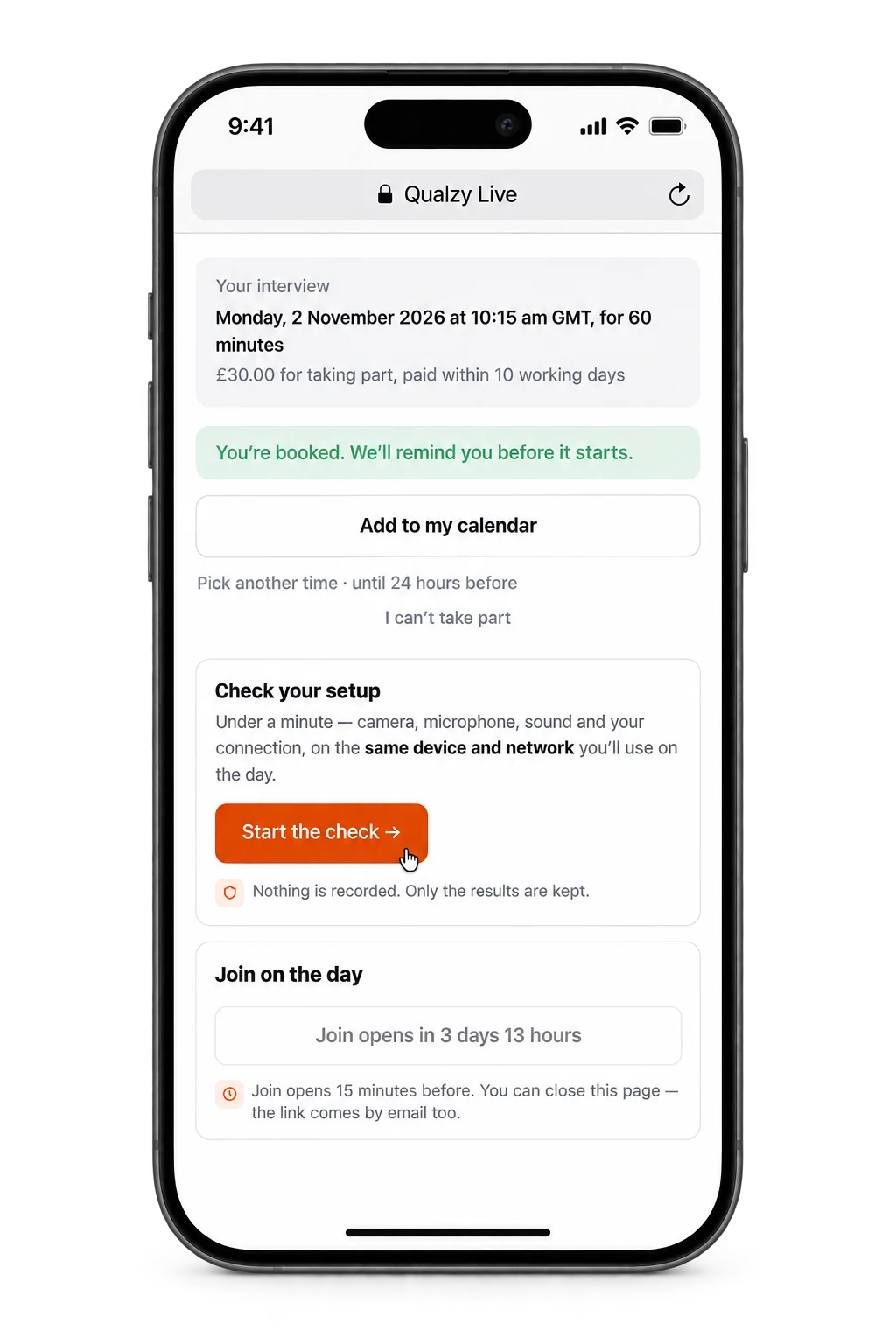
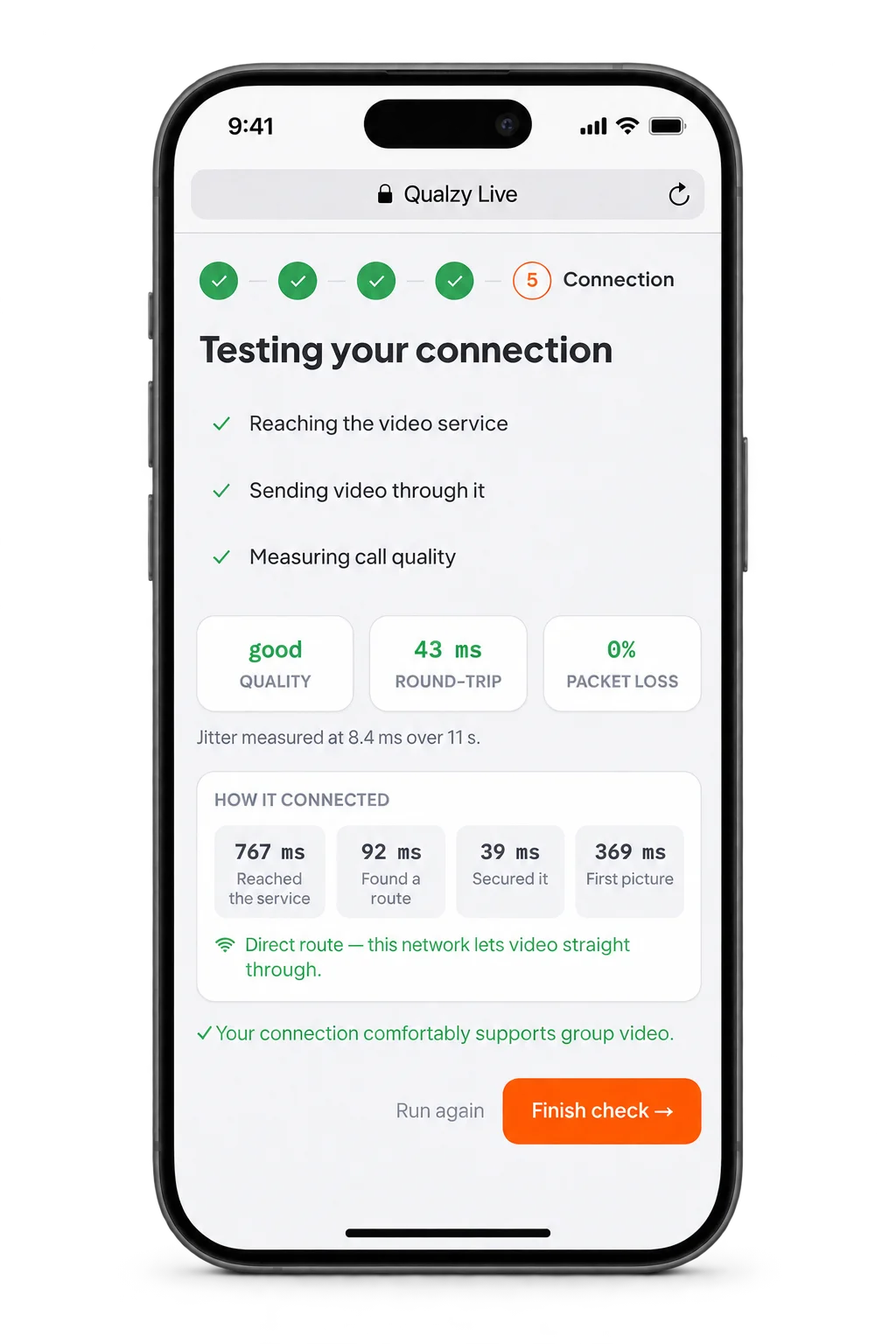
Participants pick a time that suits them, from the times you've made free.
Your session, made easy.
Your discussion guide sits beside you and takes you through the session, with your questions and prompts so nothing is forgotten. You can share your screen, of course, but your stimulus can also be presented for you with a click: images, PDFs and video, played in sync with sound, and you can see who is watching.
- A guide that takes you through. Every section becomes a chapter on the recording.
- Stimulus presented for you. No hunting for the right tab, no “can you see my screen?”
- Polls and exercises from the guide. Eight question types, dial testing, mark-up on images and PDFs, and a whiteboard.
- Breakout groups. Split from the guide, and every group recorded.
- Screen sharing, when you want it. And drawing that stays on a page as it scrolls.
- A coach beside you. Chat to Maizy at any time. Ask it what has happened in the session so far, what still needs to be asked, or if anything needs to be followed up.
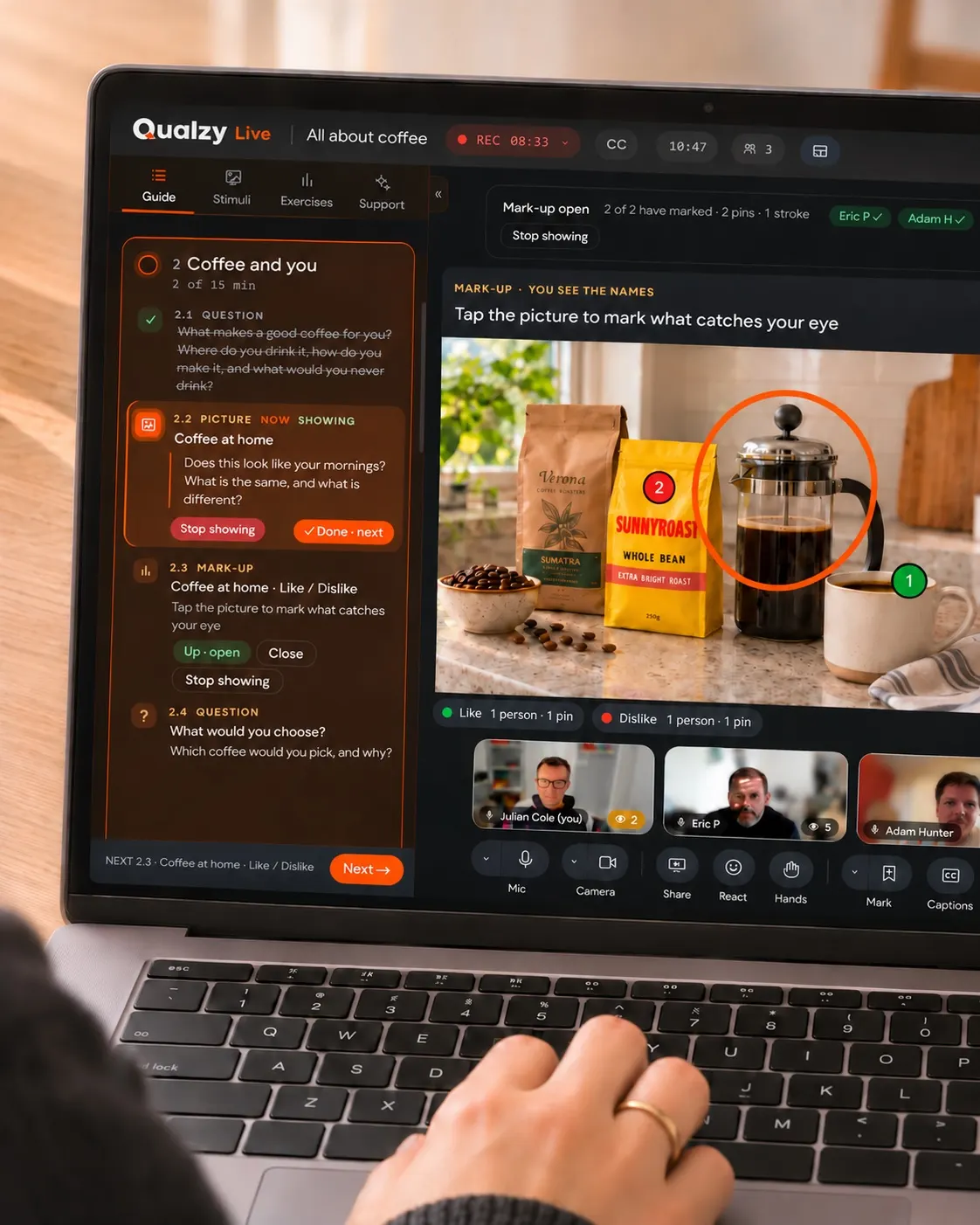
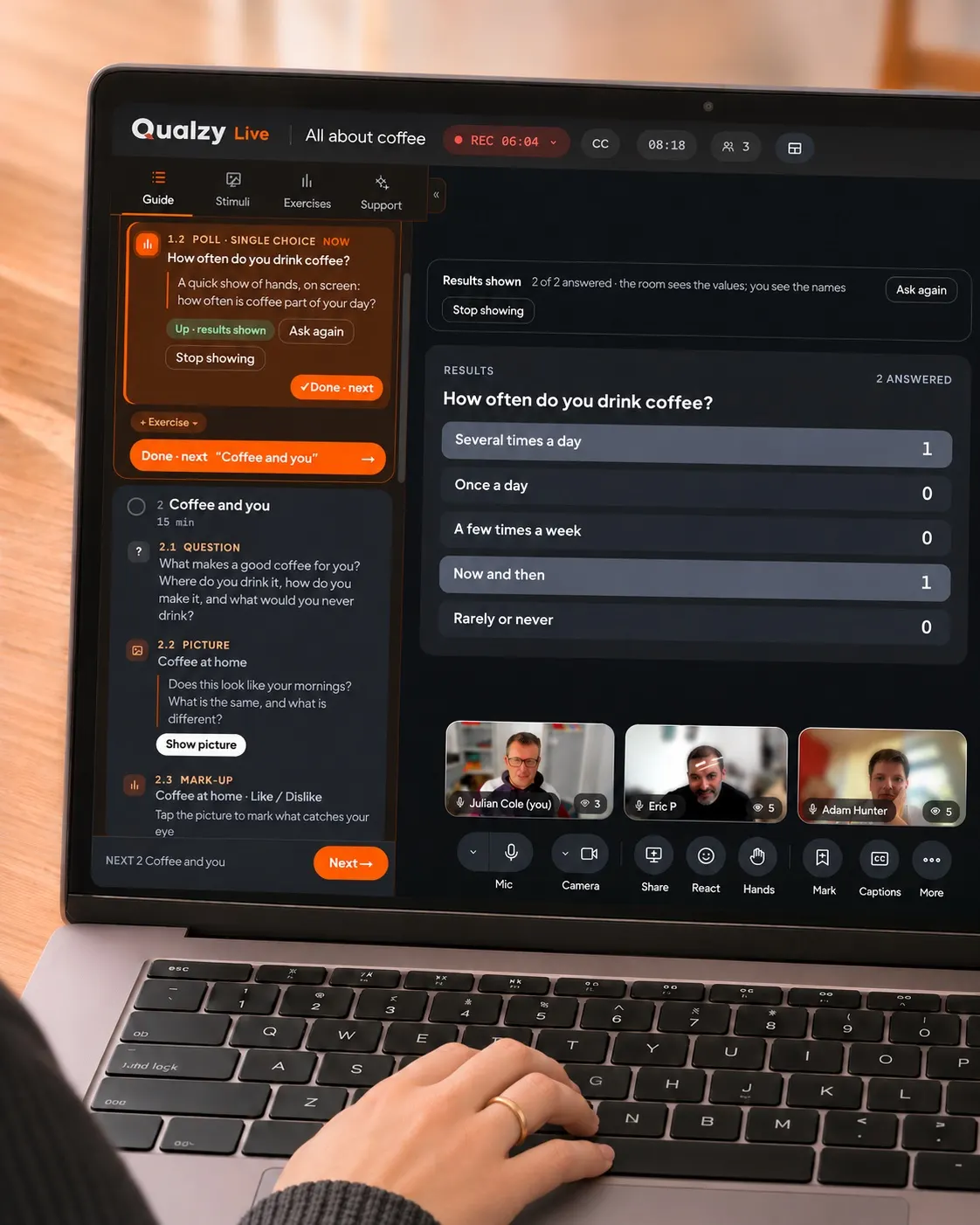
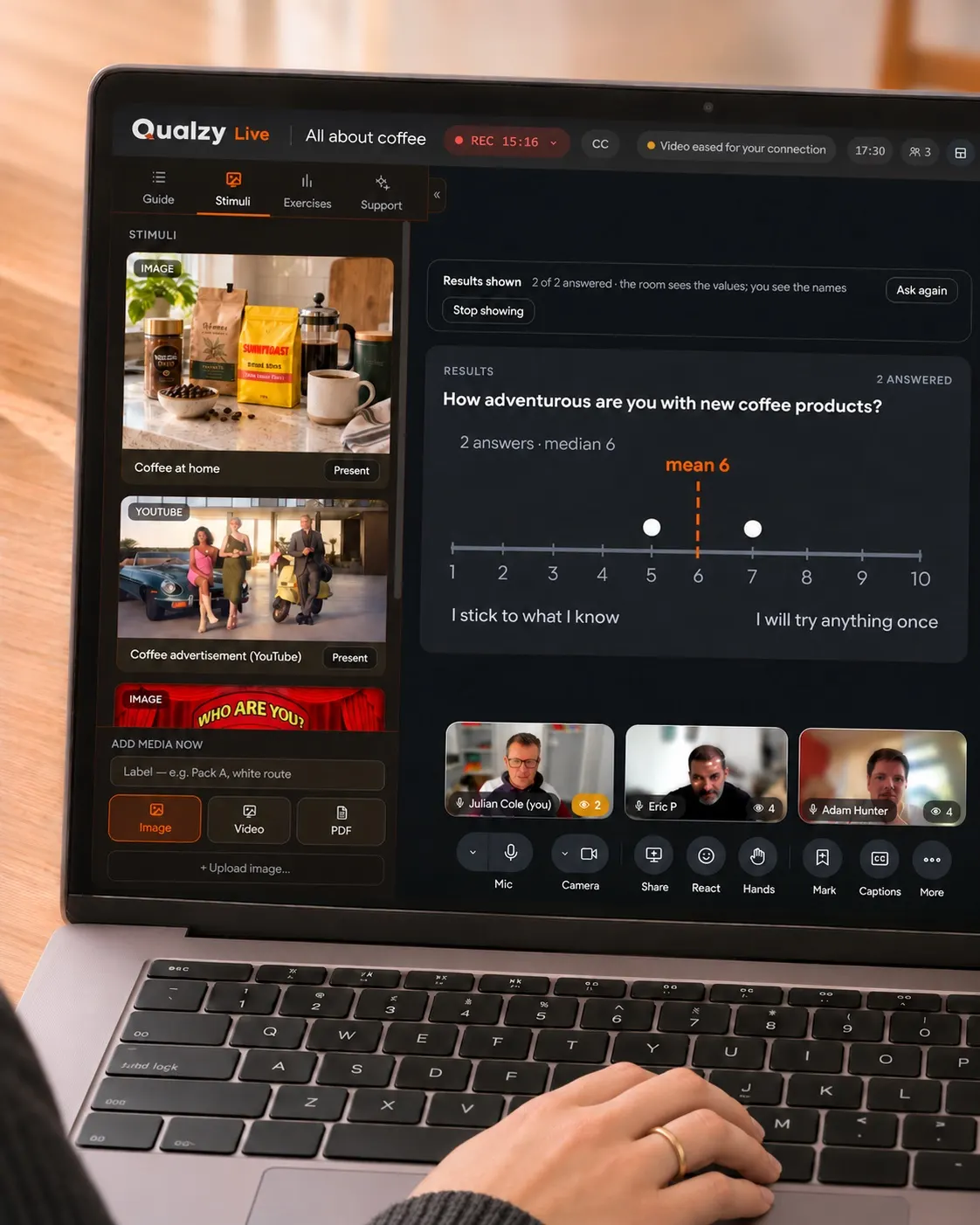
Keep what you want to cover in the guide, and show images and other stimuli with a single click.
A virtual backroom. They see everything. Nobody sees them.
From a room of their own, and the participants never know they are there.
- Invisible to participants. No camera-off tiles, no “that's just Bob”, never in the recording.
- A room of their own. Observers chat, or talk by voice or video, and nothing reaches the participants. Choose to show the backroom or live session on the main display.
- Whispers and questions. A private note that lands at the top of the moderator's screen, or a question passed into the room for them to ask when the moment is right.
- Ask Maizy. “What did Dan say about price?” Everything said so far, the guide and every poll's results, answered in seconds, for the whole backroom to read.
- They follow along. The guide live, section by section, a live transcript, and each participant's profile at a glance.
- A huddle, a debrief, every group. Step into the backroom at a break, move between breakout groups without anyone knowing, and talk it through together when the participants have gone.
- Easy to join, and free. One link, no account to set up, and observers cost nothing.
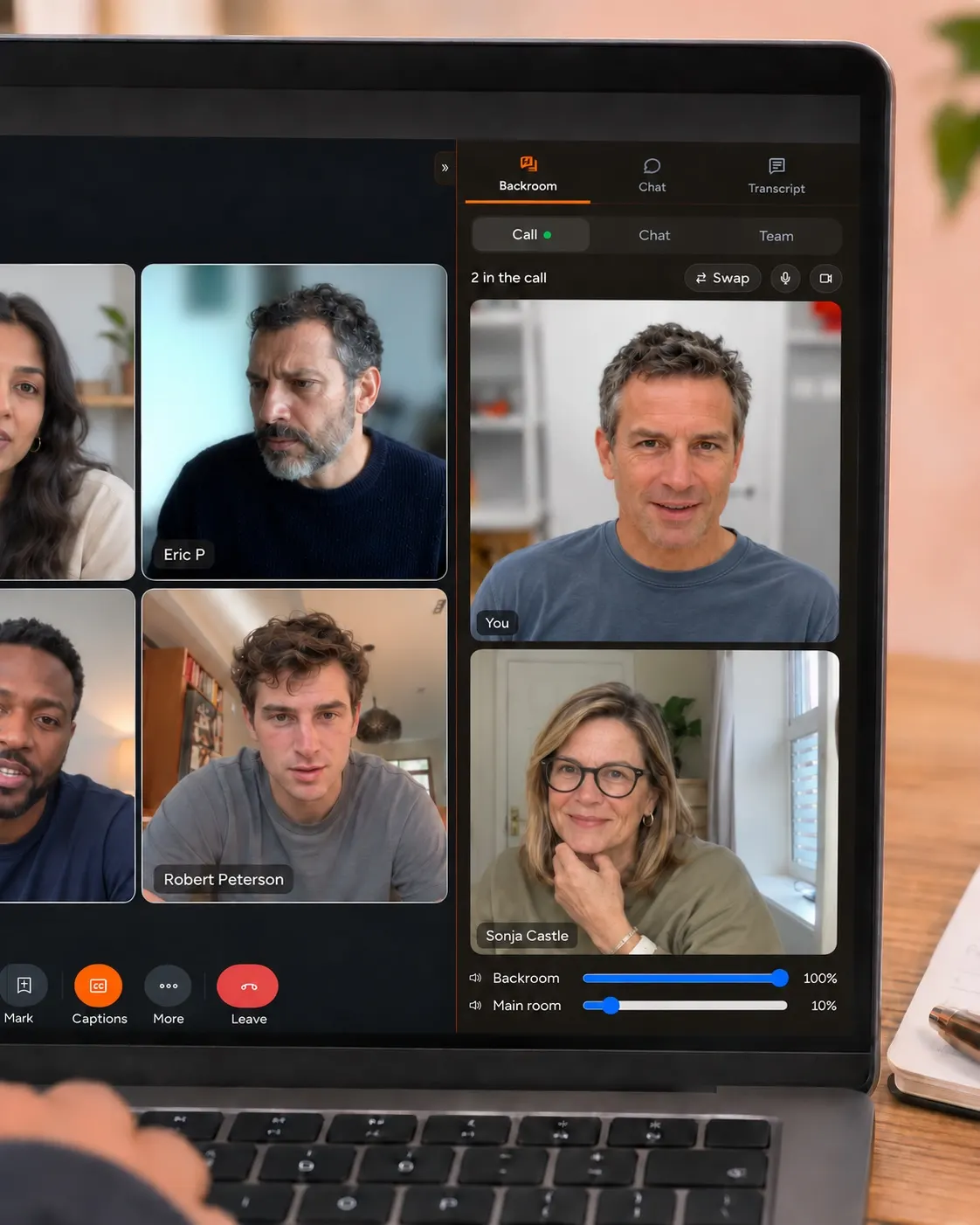
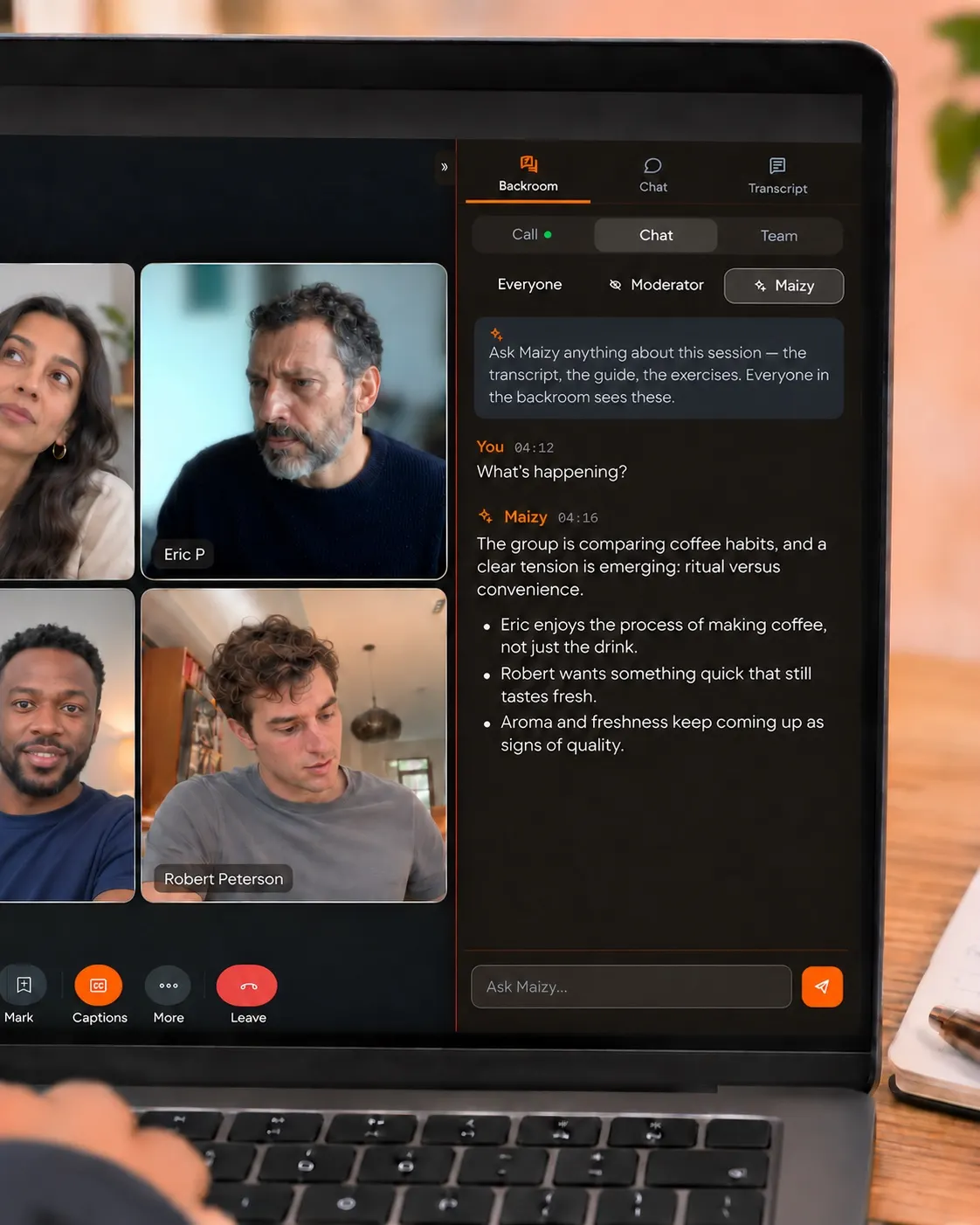
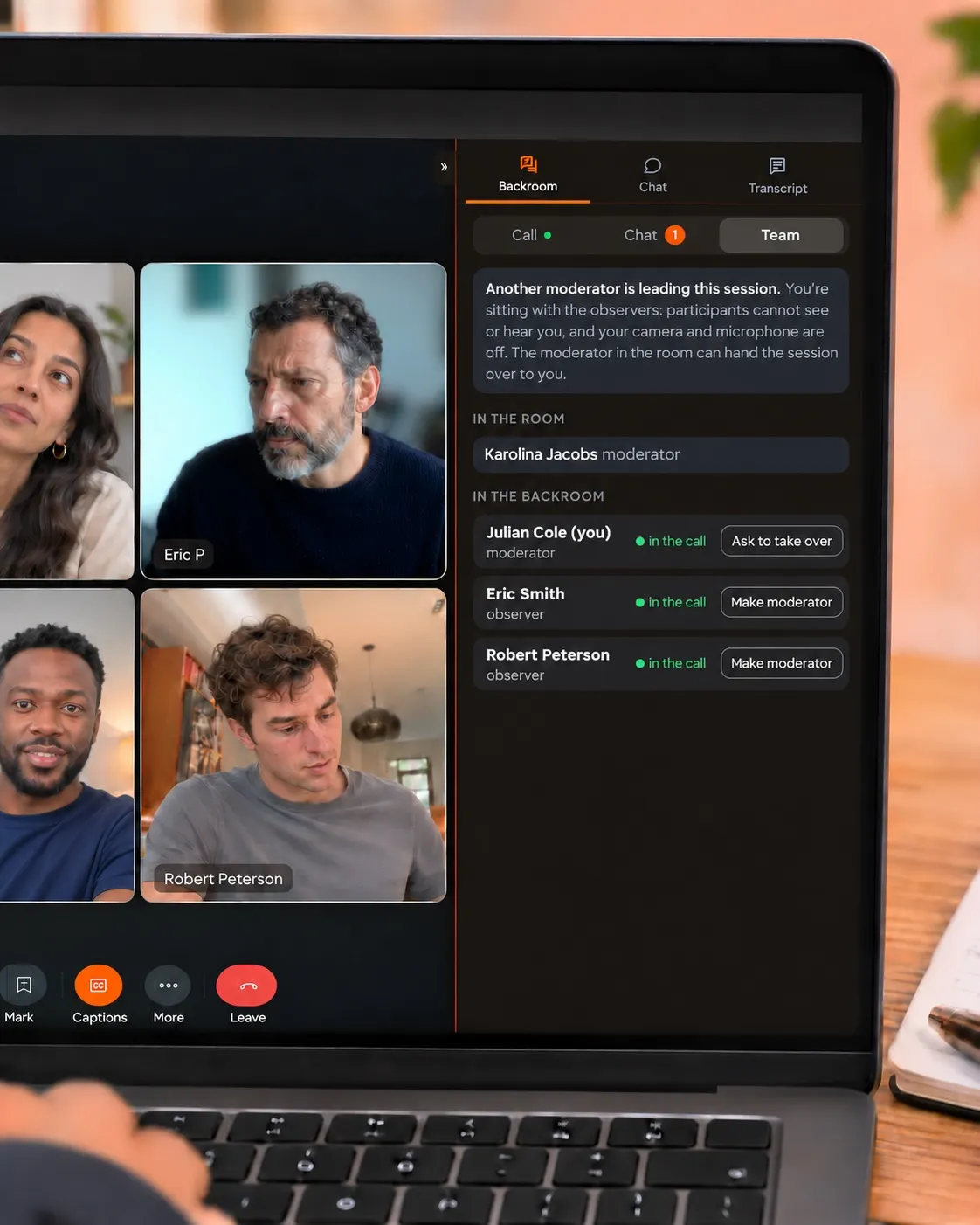
Observers get a backroom of their own, with a chat, a voice call or a full video group.
Everything tracked. Nothing missed.
Qualzy Live records more than what was said. Every exercise, every piece of stimulus on screen and every reaction is logged against the moment it happened, so the analysis Qualzy Live does for you, and the analysis you do yourself, has the full context.
- Chapters from your guide. Using a guide is optional, but if you have one, each section becomes a chapter: a powerful way to group the different parts of your sessions.
- Marked moments become clips. When something important is said, mark it, and it automatically becomes a clip of that moment, with the context around it, ready to use.
- A head start on your research. AI uses everything tracked to pull out the key points and suggest clips. A strong foundation for you to build your own analysis on.
- High-quality outputs. Each person is recorded on their own, so a clip from a group shows only the person speaking, close up, ready to download for your report.
In-person interviews, recorded on a phone or iPad.
An interview in a room is still a Qualzy Live session. Your own phone or iPad is the camera, and you come away with the same film and transcript as an online interview, with your clients able to watch from the backroom.
- Your phone or iPad as the camera. The rear camera faces the participant, and your screen shows the guide, the backroom and the live transcript.
- Nothing for the participant to do. They never touch a link. They sit down and talk to you.
- Consent read aloud and recorded. Before you start, so it sits with the film.
- Clients watch from the backroom. Just as they would for an online session, with the same chat, whispers and questions.
- The same outputs afterwards. The film, the transcript, the chapters and the clips. Who said what is worked out from the film.
- Interviews, one at a time. In-person sessions are one-to-one interviews on a single device, and need an internet connection.
Support that knows what's going on.
Every participant's connection, device and browser is tracked as the session runs. So when someone has a problem, we can work out the likely cause and the fix, and you can send it without interrupting the session.
- Quick fixes first. A “Having trouble?” button, always in view, offers participants the common fixes straight away.
- Still stuck? They tell you. They type the problem in their own words and it lands on your Support card. Nobody else is interrupted.
- An answer, ready to send. The likely cause and the fix, with the right steps for their own set-up. One click, and it appears at the top of their screen.
- Ask it yourself. About anyone's connection, or what someone said.
Live and online, in one project.
Online projects in Qualzy and live interviews and groups in Qualzy Live are two pieces of the same puzzle. Your live sessions can sit inside the same Qualzy project as your diaries, discussions and activities. Run a hybrid study in one place, and analyse everything together.
- One project, every method. Live interviews and groups alongside the rest of your study.
- Interview your best participants. At the end of a study, with the same people and no re-recruiting.
- Analysed together. Live sessions and online responses in one set of findings.
- Clips side by side. Clips from live sessions alongside everything else in the project.
Already recorded elsewhere? Import it.
Some sessions will always run on Zoom, Teams or a client's own system. Bring the recording into your Qualzy project and it's analysed alongside everything else.
Run the session anywhere
Hold your IDI or group on Zoom, Teams, Google Meet or any other tool, and keep the recording.
Import the recording
Upload the video file into your Qualzy project. Standard video formats work, and there's nothing to set up.
Analysis starts straight away
The moment it's uploaded, the recording is transcribed, translated if needed, summarised and turned into key points, each with verbatims and timestamps.
- Full transcript with timestamps, searchable
- Translation from 30+ languages
- Per-video summary of the whole recording
- Key points with verbatim quotes
- One-click clips, ready for a clip reel
- With your project data in Maizy Chat, and in Theme Analysis once fieldwork closes
It suits expert and stakeholder interviews recorded on a client's system, and hybrid projects where some interviews ran elsewhere while the diaries and discussions ran in Qualzy.
One price per session. Everything included.
Introductory pricing until 31 March 2027
No add-ons: one price per session covers everything, including observers, moderators and interpreters. On a Qualzy subscription, some sessions are included.
A session is only charged once you and a participant are both in, so a no-show costs nothing. Credits never expire.
Prices are before VAT or local taxes. For everything else Qualzy does, find out more about pricing.
Frequently asked questions.
Do participants need to install anything?
No. Sessions run in a web browser on any device: Chrome, Safari, Edge or Firefox. Participants click the link on their own page and they're in. If they open it inside an app such as WhatsApp or Instagram, they're shown how to open it in their browser.
What is an online IDI?
An in-depth interview (IDI) is a one-to-one conversation between a researcher and a participant, usually 45 to 90 minutes long, that explores a subject in detail. Online, it runs by video in the participant's browser, with your clients watching from the backroom. More on in-depth interviews.
How many people can be in a group?
Up to 12 participants. Observers watch from the backroom and don't count towards it.
Can my recruiter still do the booking?
Yes. Share your availability and the recruiter books participants into it, or participants book themselves from the same calendar. Either way the booking lands in your diary and the participant gets their own page.
Can my clients join?
Yes, in the backroom. They see and hear everything, talk to each other by chat, voice or video, and pass you questions, and the participants never see them. Observers are free.
Can I run sessions in other languages?
Yes. Sessions are transcribed in more than 30 languages and translated into your project's language. A human interpreter can join on a hidden line of their own, which your observers choose to listen to.
What about interviews in a room?
Run them as a Qualzy Live session, with your phone or iPad as the camera. Consent is recorded before you start, your clients can watch from the backroom, and you get the same film and transcript as an online session. In-person sessions are interviews, one participant at a time. More on in-person interviews.
What if someone's connection drops?
The recording carries on, because it runs on Qualzy's servers, not on anyone's computer, and everyone is recorded separately. A participant who drops is brought back in automatically, and if your own connection drops, the session carries on until you're back.
What help is there if something goes wrong?
Participants have a “Having trouble?” button with the common fixes. If they're still stuck, they tell you in their own words, and the likely cause and the fix are worked out from the session's own record, ready for you to send. More on support.
How is the data protected, and is it used to train AI?
Qualzy is ISO 27001 certified and GDPR compliant. Consent is recorded for every participant. Recordings are kept under the same ISO 27001 controls as the rest of Qualzy, and you choose how long they're kept. Nothing participants say is used to train any AI model.
Can I take the transcript and the recording elsewhere?
Yes. Download the film as an MP4, of the whole session or of each person on their own, and take the transcript into whatever you use for analysis.
Can I bring in recordings from Zoom or Teams?
Yes. Upload the recording into your Qualzy project and it's transcribed, translated if needed, summarised and broken into key points with verbatims, ready for clips, Maizy Chat and Theme Analysis. More on importing.
What does it cost?
Introductory pricing, until 31 March 2027, is £25 an interview and £60 a focus group (US$30 and US$75 in the US, and A$40 and A$110 in Australia), up to three hours, everything included, with observers, moderators and interpreters free. On a Qualzy subscription, some sessions are included. A session is only charged once you and a participant are both in, so a no-show costs nothing, and credits never expire. Prices are before VAT or local taxes.
Want to know more? Let's have a quick chat.
Book a 15-minute call and we'll talk through how you could get more out of your interviews and groups with Qualzy Live.