Video analysis for qualitative research
Qualzy transcribes, translates and summarises every video response and breaks it into key points before you press play. Any moment can become a clip, and clips build into a reel for the debrief, all without leaving Qualzy.
Every participant video goes through the same steps automatically, from the moment it arrives.
Participants upload from any browser on any device, with no app to install.
A full transcript is made as soon as the video arrives, plus a translation for multilingual projects.
AI pulls out the key points, each with timestamped verbatims. A 20-minute video becomes a few key points in minutes.
Turn any verbatim into a video clip with one action, ready for themes or a clip reel.
Gather clips from across participants, add titles and a title card, and export an MP4.
Every video and audio response is transcribed and translated automatically, before you even open the project. You arrive to structured text, not raw footage.
Every video and audio upload is automatically transcribed the moment it arrives. Researchers see the full transcript alongside the video, timestamped throughout. Mark start and end points directly from the transcript, or scrub through the video. Either way, you're navigating by words, not time codes.
For multilingual projects, a translated version is created alongside the original. Researchers can moderate and analyse in English while participants respond in their own language. Both versions are preserved, the original for accuracy, the translation for speed. Subtitles are generated automatically and shown during video playback.
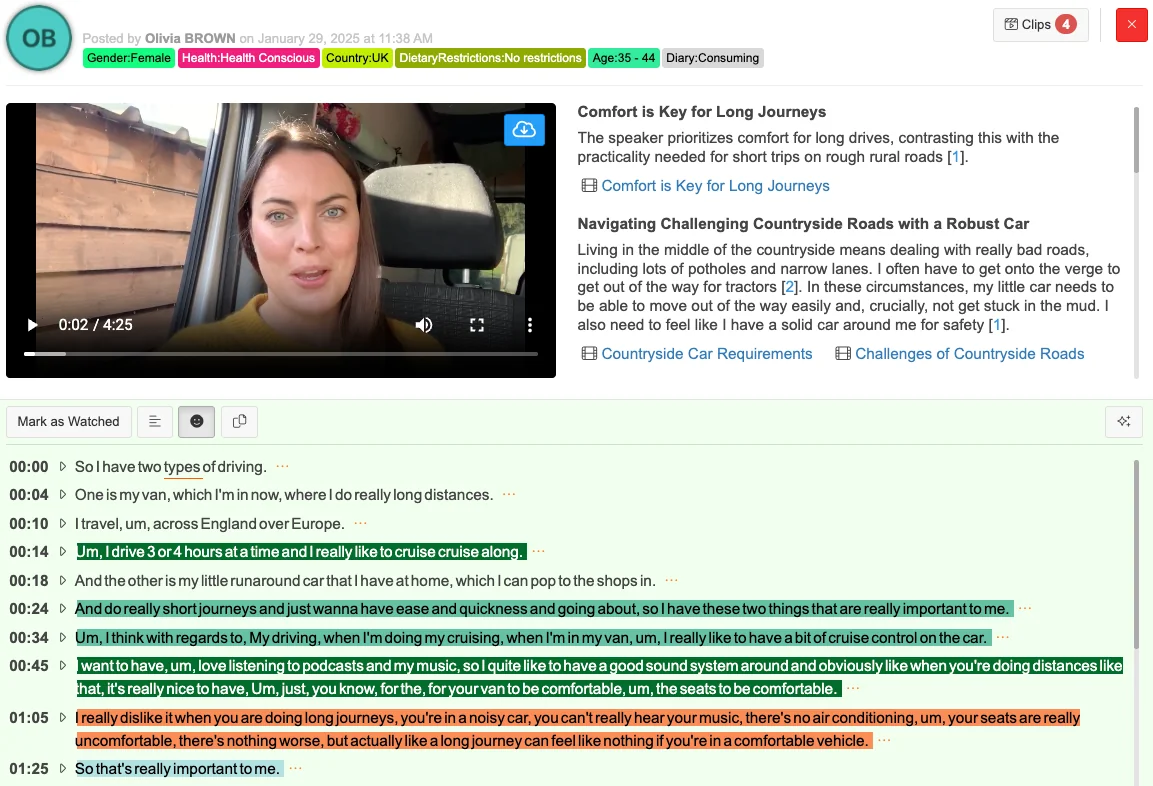
AI extracts key points from every video transcript: structured, navigable, and ready to act on. You can still watch any video in full, but you'll know what's in it first.
AI reads the transcript and identifies each distinct thought or theme in that participant's submission, turning a 20-minute monologue into a short set of structured key points.
Supporting each key point: the exact quotes from the transcript that led AI to that conclusion, timestamped, so clicking a verbatim jumps straight to that moment in the video.
Every verbatim can be turned into a video clip with one action. No scrubbing, no time codes to note down. The clip is immediately available across the whole project.
Maizy Chat can query across all key points from all video responses at any point, during or after fieldwork. Ask "What did participants say about price?" and get an answer drawn from every submission in the project.
A short reel of participants saying it in their own words often lands better than a page of quotes. Build one from your clips inside Qualzy, ready for the debrief.
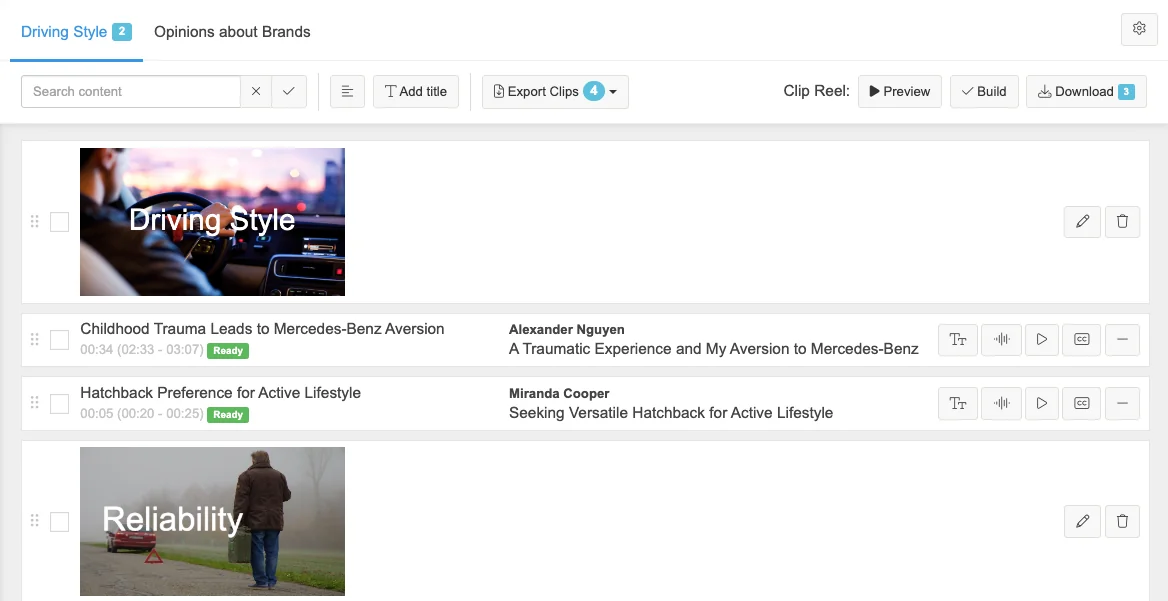
Pull clips from any participant's video, across the entire project. Find them by key point or by theme.
Reorder clips freely. Tell the story in the sequence that makes the most sense for your audience, not the order in which fieldwork ran.
Introduce themes or groupings between clips with branded title cards. Give stakeholders clear signposts through the reel.
Smooth transitions between clips and a branded opening card.
Export a 1080p MP4 for stakeholders straight from Qualzy, with no editing software and no wait for a video editor to have time.
Every clip comes from a transcribed verbatim, so subtitles are generated automatically and shown on playback. No captioning tool needed, and no silent clips for viewers watching without sound.
I've just been having a play with the video clips feature, it's so useful, I love it! Saved me so much time in finding clips to bring my report to life.
Video clips and key points are full project data. Every clip, verbatim and key point sits alongside your text and form responses in the same project, and you can query them all from the same places.
Ask "What did participants say about price?" and Maizy Chat draws on key points from every video response in the project, at any point during or after fieldwork.
When you generate themes after fieldwork closes, key points from video responses sit alongside text responses. A mixed-methods project gets a mixed-methods analysis, with the video in the same place as everything else.
Reference clips from themes and key point panels. Video evidence is always one click away, wherever you're working in the project.
Narrow the key points and clips to one group, such as an age band or a market, with the same filters as the rest of the project.
Run them in Qualzy Live and the recordings arrive with transcripts, key points and suggested clips. Sessions you've already recorded on Zoom or Teams can be imported for the same analysis.
See Qualzy LivePut in a study of your own and see how much footage you'd otherwise sit through.
Before you've made a single note, and that's watching at normal speed with no going back.
Each one arrives with a transcript, a summary and key points, every point with the timestamped verbatims behind it. You read first, then watch only the moments that matter, and any verbatim is one click from a clip.
Tell us about the volume, the deliverables, what takes the longest. We’ll ask a few questions and you’ll have a clear picture of how Qualzy could work for you by the end of the call.
