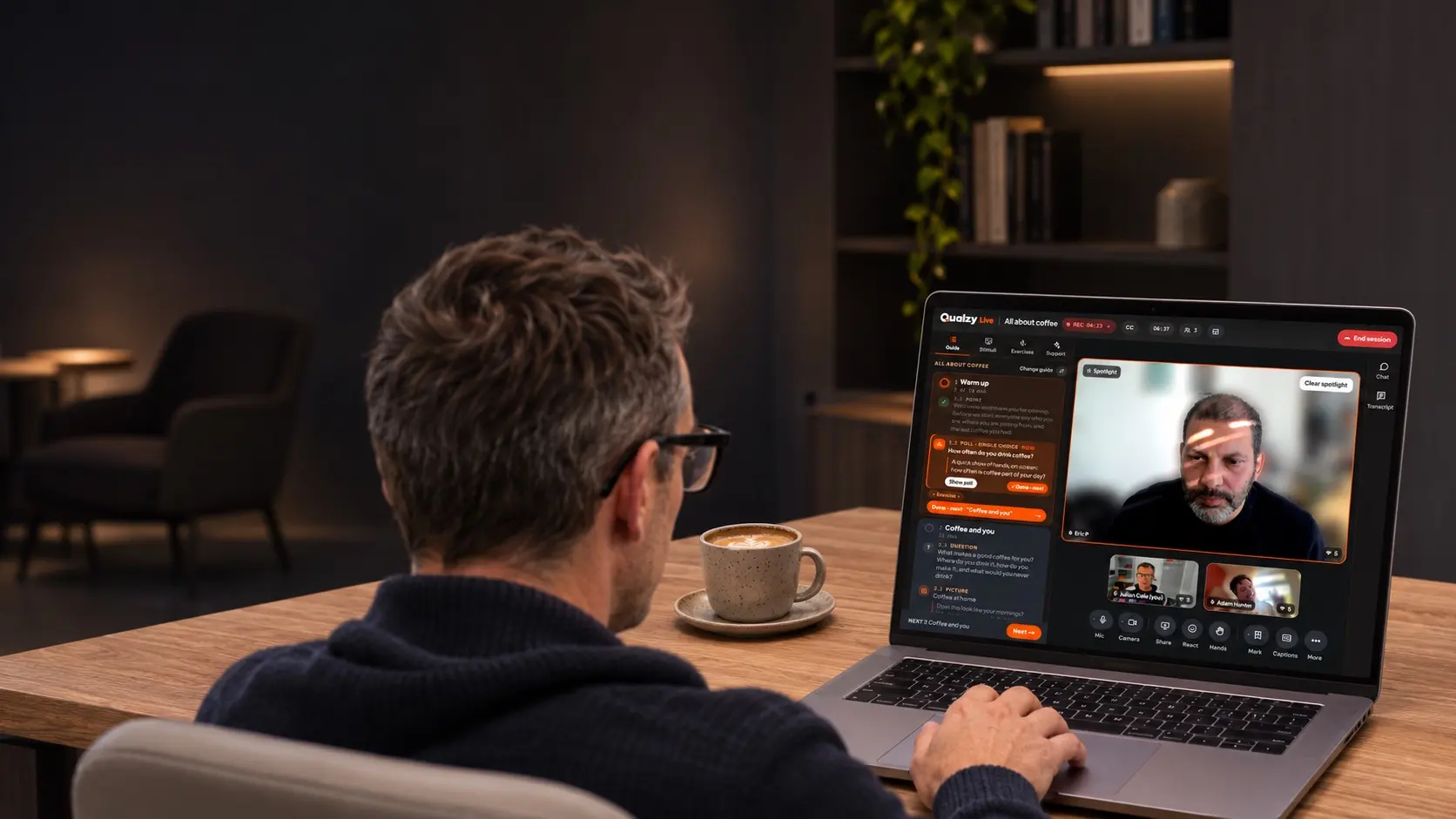
To run an online focus group, recruit five or six participants plus a reserve, keep the session to 60–90 minutes, and tech-check everyone days before. Write a shorter guide than you would for a room, put individual tasks before group discussion, present stimulus from inside the platform, and keep observers in a hidden backroom.
Most of what makes a good group in a viewing facility still applies on screen. What changes is the margin for error: a late arrival, a frozen camera or a fumbled screen share costs more online, with less of the room's energy to carry you through.
Group size: smaller than you'd seat in a room
Around a table, eight is a comfortable number. Online, five or six usually works better. People can't read the small cues that tell them when to come in, so they wait, talk over each other and apologise, and the quieter ones drift. Fewer faces means each person gets more of the conversation and you can see everyone at once.
Do the sums. Take 90 minutes, subtract your questions, the stimulus and the warm-up, and share out what's left. With six people, each gets perhaps 10 minutes. With eight, it's nearer seven.
Qualzy Live takes up to 12 participants in a group, and there are good reasons to go bigger now and then, such as a creative session with breakout groups. As a default, though, recruit six to sit and hold one or two in reserve.
Length: 90 minutes is plenty
Concentration fades faster on a video call than in a room: the inbox is one click away, and sitting still in front of a camera is tiring. Aim for 60 to 90 minutes for a group and 45 to 60 for an in-depth interview. If the brief really needs two hours, build in a five-minute break with cameras off, and tell people about it at the start so they don't wander off to make tea in the middle of your key section.
Recruitment and no-shows
No-shows hurt more online because not turning up costs the participant nothing. (There's more on screeners, incentives and over-recruiting in our guide to recruiting and paying participants.) A few habits bring the rate down:
- Screen for the setting as well as the profile. Ask whether people can join from somewhere quiet, with a working camera, for the whole session. Someone joining from the school gate won't give you much.
- Tech-check days before, not minutes before. A camera, microphone and connection test a few days out leaves time to fix problems or swap someone in. In Qualzy Live it's part of booking, so you can see who has passed and chase anyone who hasn't.
- Remind, and ask for a confirmation. A reminder the day before and another an hour before, each with a one-click confirm, shows you who's wavering while you can still do something about it.
- Keep reserves. One or two per group, told plainly that they may be thanked and paid without taking part. If everyone turns up, release them at the start with their incentive.
- Open the waiting room early. Admit people 10 or 15 minutes before the start and sort out sound and cameras before the clock is running.
Make booking easy, too. Every email that goes back and forth is a chance to lose someone, so let participants pick from times you've made free, or have your recruiter book them straight in.
Write a shorter discussion guide
Online, every section takes a little longer than you expect: introductions, stimulus going up, someone unmuting. Plan for about two thirds of the content you'd cover face to face, and put a timing against every section.
- Warm up with names and something to show. Ask everyone to hold up something related to the topic from where they're sitting. Every camera and every voice is tested in the first five minutes.
- Individual first, then group. Before you open a topic up, run a quick poll or ask people to type a first reaction. You get everyone's view before the loudest voice sets the tone, and you know whose answer to bring in when the discussion needs a different angle.
- Write your probes into the guide. With six faces, a backroom and a clock to manage, it's easy to forget the follow-up you meant to ask. Have it on the page.
- Mark the must-haves. When you overrun, you need to see at a glance which questions can go.
In Qualzy Live the guide sits beside you during the session, with your questions, prompts, polls and stimulus in order, and each section becomes a chapter on the recording. You can ask Maizy, the built-in AI coach, what has been said so far. It keeps track of what's still to cover, suggests follow-up questions from what was just said, and shows you who has gone quiet.
Stimulus without the screen-share scramble
Screen sharing is where online groups most often come unstuck: the wrong tab, a notification sliding in, a video that plays without sound for half the group. If you can, load stimulus into the platform before the session and present it from there.
Then plan the reactions:
- Show one thing at a time, then allow a few quiet seconds.
- Collect an individual response first: a rating, a word typed into a poll, a pin on the part of the advert they noticed.
- For packs, pages and adverts, pin tasks and mark-up show exactly which part people mean. “The bit at the top” won't help you much in the debrief.
- For video, make sure it plays in sync, with sound, for everyone, and check who's actually watching.
Qualzy Live presents images, PDFs and video with one click, plays video in sync with sound, shows you who is watching, and runs polls, dial testing, pin tasks with heat maps and mark-up on PDFs straight from the guide. The full list is on the Qualzy Live features page.
The client backroom
Clients watching is one of the reasons to run groups at all, and one of the easiest ways for a group to go wrong. A row of camera-off tiles labelled “Observer” changes how participants behave. A client who unmutes to ask a question changes it more.
Keep observers out of the room entirely. In Qualzy Live they sit in a backroom of their own, invisible to participants and never in the recording. They can chat, or talk by voice or video, follow the guide and a live transcript, and see each participant's profile. They join from a link with no account to set up.
The habits matter more than the technology:
- Brief observers beforehand. What the session is for, which parts of the guide matter most, and that one remark from one participant isn't a finding.
- Agree how questions reach you. Ask one person in the backroom to collect questions and send only the ones that matter. In Qualzy Live they can send you a private note, or pass a question into the room for you to ask when the moment's right.
- Tell them when you'll look. You can't read a stream of messages and moderate at the same time. Say you'll check at the end of each section and at the break.
- Debrief straight away. Ten minutes with the backroom once the participants have left is worth more than an hour-long meeting next week.
Participants should still know they may be observed and that the session is recorded. Your code of conduct will expect it. Keeping observers hidden is about removing distraction. It doesn't replace telling people.
Interpreters and other languages
For international work, the usual set-up is a local moderator running the group in the participants' language, with an interpreter for the client team. Online, that interpreter needs a channel the participants can't hear and the observers can choose to listen to.
Qualzy Live puts the interpreter on a hidden line of their own, which observers switch to when they want it. Sessions are transcribed in more than 30 languages and translated into the project's language, and each moderator and observer can follow live captions in their own language. Brief your interpreter all the same: send the guide and stimulus a few days ahead with a list of brand and product names, and ask them to interpret in the first person, so the backroom hears the participant's words rather than a summary of them.
Recording, consent and analysis
Record everything, tell people you're recording, and get consent before you start. Qualzy Live records consent for every participant and records each person separately, so a clip from a group shows only the person speaking, close up. If someone's connection drops, the recording carries on and they're brought back in automatically.
Good analysis starts during the session. When something important is said, mark it: in Qualzy Live a marked moment becomes a clip, with the context around it. Afterwards, each section of the guide is a chapter you can jump to, the transcript is searchable and moves the video to the right point, and AI pulls out key points and suggests clips as a starting point for your own analysis. If you'd rather work elsewhere, you can download the whole session or each person's recording as an MP4, with the transcript.
One habit worth keeping whatever tools you use: write your top-line notes within an hour of finishing, before you open a transcript. What struck you in the session is evidence too, and it fades quickly.
Groups work better as part of a bigger project
A pre-task a few days before (some questions, a photo, a short video) means people arrive having thought about the topic, and you arrive knowing them. Afterwards, the most interesting people from a discussion or diary are the ones to invite for an interview. We've written more about these formats in asynchronous qualitative research explained.
In Qualzy, live sessions sit inside the same project as your discussions and diaries, so it's all analysed together and there's no re-recruiting.
What about Zoom or Teams?
Plenty of good groups run on Zoom and Microsoft Teams. They're built for meetings, though, so jobs like tech checks, hidden observers and stimulus without a screen share need workarounds. We've set out the differences in Qualzy Live compared with Zoom and Teams. If some sessions have to run on a client's own system, you can import the recordings into your Qualzy project and analyse them alongside everything else.
What Qualzy Live costs
Qualzy Live is priced per session, and one price covers everything, with observers, moderators and interpreters included. On a Qualzy subscription, some sessions are included. It has introductory pricing at the moment: see Qualzy Live introductory pricing.